Ambassador programme
How to reach your dashboard and share your link
Three minutes. No password, nothing to remember: every time you sign in we email
you an access link.
One thing to know first
The dashboard itself is in Spanish. We have kept every button name in
Spanish below, exactly as it appears on screen, with the English meaning next to it.
Nothing else is needed to use it.
Signing in
Open the sign-in page
Go to portal.360aviationlife.com/affiliate/login.
This is what you will see:
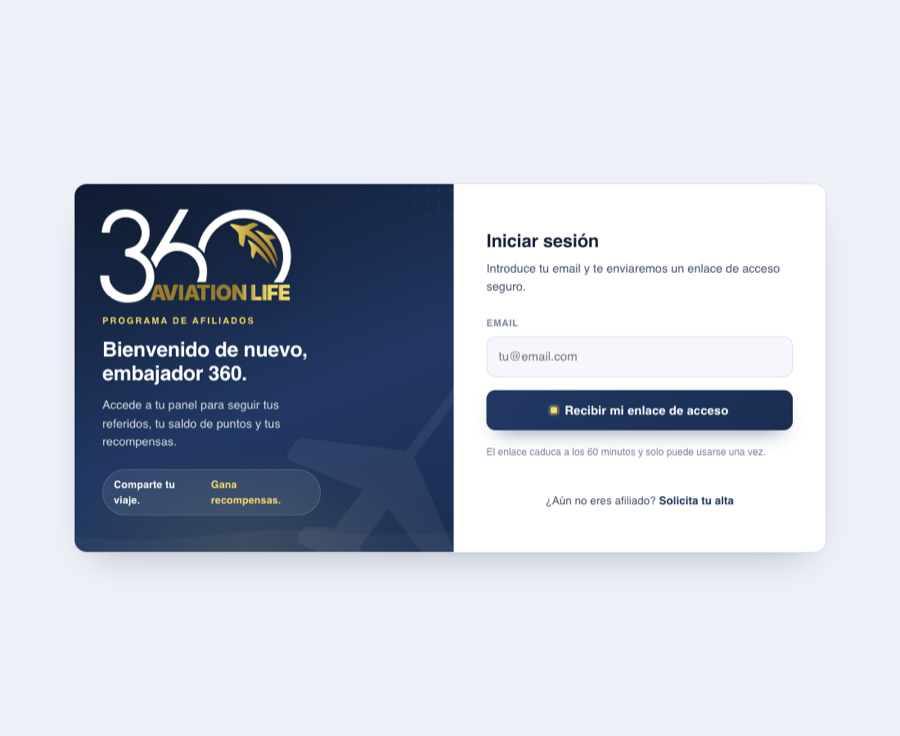
The sign-in screen, as you will find it.
Enter your email and press «Recibir mi enlace de acceso»
That button means «send me my access link». Use the same address our message
was sent to. Any other address will not be recognised as an ambassador.
Open the email we send you
It arrives in seconds, with the subject «Tu enlace de acceso al portal de afiliados».
Click the link and you are in.
Why it expires
That link lasts 60 minutes and works only once. It is not a fault:
it is what stops anyone who glances at your inbox from reaching your dashboard. If
the hour has passed, or you already used it, go back to step 1 and request another.
There is no limit.
Sharing your link
Inside the dashboard, the block called «Enlace para compartir» (your
sharing link) has a button that reads «Copiar enlace», meaning «copy
link». That link is yours and never changes.
Press «Copiar enlace»
The link is copied to your phone or computer.
Paste it into WhatsApp
In a chat with the person you want to refer. One to one, in a group, wherever makes
sense to you.
That is it
When they open the link, WhatsApp opens with the message already written and all
they do is hit send. Our assistant replies in seconds, at any hour, and stays with
them until their questions are answered. You explain nothing else.
Do not click your own link
It is built for the person you refer, not for you. If you click it
yourself, all it does is open a chat where you message
us, and it does not count as a referral. Your job is to copy it and
forward it.
What you earn
| Full licence pack | 100 € |
| FAA A&P or B2 differences | 50 € |
| Single module | 30 € |
1 point equals 1 €. You earn the points when the person you referred
buys, not when you refer them.
Seeing your points and referrals
The dashboard has six blocks, in this order. At the top, side by side, are your link
and your balance:
«Tu código de afiliado» and «Enlace para compartir»
Top left: your affiliate code and your sharing link, with the «Copiar enlace» button.
«Saldo disponible» (available balance)
To its right. Your total points and, next to them, how many you can cash out
right now. Those two numbers do not always match, and the reason is just
below. The redemption form lives here too.
«Tus recompensas» (your rewards)
The table of what each type of sale is worth. Reference only.
«Tus referidos» (your referrals)
Who has bought thanks to you, with date, reward and status. People
appear here only once the payment is complete.
«Referidos en proceso» (referrals in progress)
This is the one that will matter most early on: people who have already
contacted us through your link but have not bought yet. They show as
«Pendiente de compra» (pending purchase) and move to «Tus referidos» on their own once
they pay. If you referred someone and cannot find them in the list above, look here.
«Tus redenciones» (your redemptions)
The history of what you have already cashed out: date, points, method and status.
Why some points cannot be cashed out yet
A point becomes redeemable 30 days after the sale is validated. That
window exists because a purchase can be refunded within it. If you see a balance but
the dashboard says nothing is available yet, it is not an error: your points are still
maturing. They appear on their own once the window closes.
Cashing out
Enter how many points you want
In the «Saldo disponible» block, the field «Puntos a redimir» (points to redeem)
already shows the maximum you can request at that moment.
Choose how you want it
«Tarjeta regalo» (gift card). It arrives by email and you spend it
wherever you like. It is what every ambassador who has cashed out so far has chosen.
«Crédito de formación» (training credit). It becomes a discount on a
purchase with us. Worth it if you plan to keep training.
Press «Redimir»
That means «redeem». Gift card goes to your inbox; training credit is held in your
name for your next purchase.
There is a cap
You can cash out up to 100 points every 30 days. Anything above that
is not lost: it stays in your balance for the next window. The dashboard tells you when
you have hit the limit.
If something does not work
The access email never arrives
Check spam and promotions. If it is still missing, make sure you typed the same
address you are registered with. If that is not it, write to
info@360aviationlife.com.
It says the link is not valid
One of two things happened: more than 60 minutes passed, or you had already used it.
Request another from the sign-in page. There is no limit.
I have points but it will not let me cash out
Most likely the 30 days since the sale was validated have not passed, or you have
already redeemed 100 points in the last 30 days. Either way the balance stays yours
and frees up on its own.
It says I have no active code
Write to us and we will look into it. It is not something you can fix from the
dashboard.
I referred someone and they are not in «Tus referidos»
Check «Referidos en proceso» first, further down the same page. That
is where people who contacted us through your link but have not bought yet appear.
«Tus referidos» only fills in once payment completes. If they have bought and appear
in neither, write to us with their name.